Map the official objectives.
Read the current Microsoft objectives and make a short list of the areas you need to revisit before booking SC-300.
MICROSOFT CERTIFICATION STUDY GUIDE
Validates skills in managing identity and access in Microsoft environments.
Download Revizo
Validates skills in managing identity and access in Microsoft environments.
Exam details are based on the available Microsoft catalogue information. Confirm current requirements with the exam provider before booking.
Use the provider's current objectives as your source of truth, then organise your Revizo sessions around the Microsoft technologies, product capabilities and implementation decisions named in the certification. The SC-300 exam is listed as Multiple choice questions; your starting point should reflect 1+ years of identity management experience.
Read the current Microsoft objectives and make a short list of the areas you need to revisit before booking SC-300.
Select SC-300 in Revizo and use focused question sessions to test one topic or decision type at a time, rather than relying on a single long cram session.
Use your results to return to incorrect answers, revisit the official material behind them and repeat short SC-300 practice sessions until the gaps are clearer.
FREE PRACTICE PREVIEW
Review each question, its correct answer and any available source explanation before continuing your certification study in Revizo.
Answers & available explanations
QUESTION 1
You have an Azure Active Directory (Azure AD) tenant that contains the following objects:
✑ A device named Device1
✑ Users named User1, User2, User3, User4, and User5
✑ Groups named Group1, Group2, Group3, Group4, and Group5
The groups are configured as shown in the following table.
To which groups can you assign a Microsoft Office 365 Enterprise E5 license directly?
Correct answer: B
QUESTION 2
You have a Microsoft Exchange organization that uses an SMTP address space of contoso.com.
Several users use their contoso.com email address for self-service sign-up to Azure Active Directory (Azure AD).
You gain global administrator privileges to the Azure AD tenant that contains the self-signed users.
You need to prevent the users from creating user accounts in the contoso.com Azure AD tenant for self-service sign-up to Microsoft 365 services.
Which PowerShell cmdlet should you run?
Correct answer: A
QUESTION 3
You have a Microsoft 365 tenant that uses the domain named fabrikam.com. The Guest invite settings for Azure Active Directory (Azure AD) are configured as shown in the exhibit. (Click the Exhibit tab.)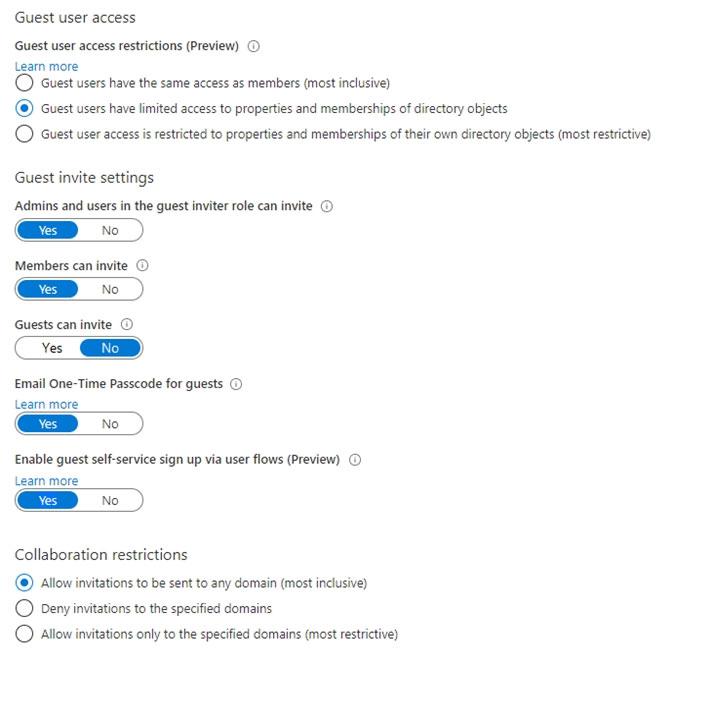
A user named [email protected] shares a Microsoft SharePoint Online document library to the users shown in the following table.
Which users will be emailed a passcode?
Correct answer: B
QUESTION 4
You have 2,500 users who are assigned Microsoft Office 365 Enterprise E3 licenses. The licenses are assigned to individual users.
From the Groups blade in the Azure Active Directory admin center, you assign Microsoft 365 Enterprise E5 licenses to the users.
You need to remove the Office 365 Enterprise E3 licenses from the users by using the least amount of administrative effort.
What should you use?
Correct answer: C
QUESTION 5
HOTSPOT -
You have a Microsoft 365 tenant named contoso.com.
Guest user access is enabled.
Users are invited to collaborate with contoso.com as shown in the following table.
From the External collaboration settings in the Azure Active Directory admin center, you configure the Collaboration restrictions settings as shown in the following exhibit.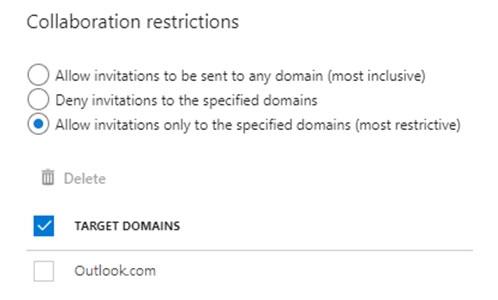
From a Microsoft SharePoint Online site, a user invites [email protected] to the site.
For each of the following statements, select Yes if the statement is true. Otherwise, select No.
NOTE: Each correct selection is worth one point.
Hot Area: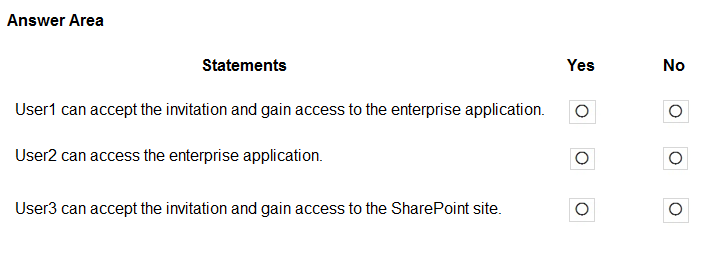
Correct answer: Y, Y, N
QUESTION 6
You have an Azure Active Directory (Azure AD) tenant named contoso.com.
You plan to bulk invite Azure AD business-to-business (B2B) collaboration users.
Which two parameters must you include when you create the bulk invite? Each correct answer presents part of the solution.
NOTE: Each correct selection is worth one point.
Correct answer: A, B
QUESTION 7
You have an Azure Active Directory (Azure AD) tenant that contains the objects shown in the following table.
Which objects can you add as members to Group3?
Correct answer: E
QUESTION 8
DRAG DROP -
You have an on-premises Microsoft Exchange organization that uses an SMTP address space of contoso.com.
You discover that users use their email address for self-service sign-up to Microsoft 365 services.
You need to gain global administrator privileges to the Azure Active Directory (Azure AD) tenant that contains the self-signed users.
Which four actions should you perform in sequence? To answer, move the appropriate actions from the list of actions to the answer area and arrange them in the correct order.
Select and Place: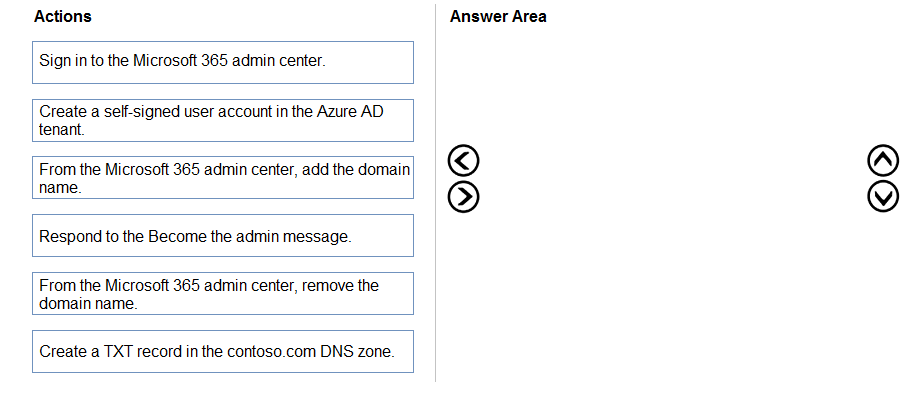
Correct answer: Item 1: B · Item 2: A · Item 3: D · Item 4: F
QUESTION 9
HOTSPOT -
You have an Azure Active Directory (Azure AD) tenant that contains a user named User1 and the groups shown in the following table.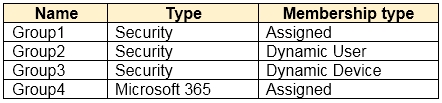
In the tenant, you create the groups shown in the following table.
Which members can you add to GroupA and GroupB? To answer, select the appropriate options in the answer area.
NOTE: Each correct selection is worth one point.
Hot Area: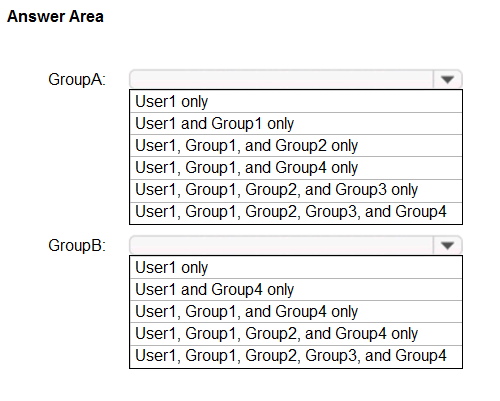
Correct answer: Item 1: E · Item 2: A
QUESTION 10
Note: This question is part of a series of questions that present the same scenario. Each question in the series contains a unique solution that might meet the stated goals. Some question sets might have more than one correct solution, while others might not have a correct solution.
After you answer a question in this section, you will NOT be able to return to it. As a result, these questions will not appear in the review screen.
You have an Active Directory forest that syncs to an Azure Active Directory (Azure AD) tenant.
You discover that when a user account is disabled in Active Directory, the disabled user can still authenticate to Azure AD for up to 30 minutes.
You need to ensure that when a user account is disabled in Active Directory, the user account is immediately prevented from authenticating to Azure AD.
Solution: You configure password writeback.
Does this meet the goal?
Correct answer: B
QUESTION 11
Note: This question is part of a series of questions that present the same scenario. Each question in the series contains a unique solution that might meet the stated goals. Some question sets might have more than one correct solution, while others might not have a correct solution.
After you answer a question in this section, you will NOT be able to return to it. As a result, these questions will not appear in the review screen.
You have an Active Directory forest that syncs to an Azure Active Directory (Azure AD) tenant.
You discover that when a user account is disabled in Active Directory, the disabled user can still authenticate to Azure AD for up to 30 minutes.
You need to ensure that when a user account is disabled in Active Directory, the user account is immediately prevented from authenticating to Azure AD.
Solution: You configure pass-through authentication.
Does this meet the goal?
Correct answer: A
QUESTION 12
Note: This question is part of a series of questions that present the same scenario. Each question in the series contains a unique solution that might meet the stated goals. Some question sets might have more than one correct solution, while others might not have a correct solution.
After you answer a question in this section, you will NOT be able to return to it. As a result, these questions will not appear in the review screen.
You have an Azure Active Directory (Azure AD) tenant that syncs to an Active Directory forest.
You discover that when a user account is disabled in Active Directory, the disabled user can still authenticate to Azure AD for up to 30 minutes.
You need to ensure that when a user account is disabled in Active Directory, the user account is immediately prevented from authenticating to Azure AD.
Solution: You configure conditional access policies.
Does this meet the goal?
Correct answer: B
QUESTION 13
You have an Azure Active Directory (Azure AD) tenant that contains the following objects.
✑ A device named Device1
✑ Users named User1, User2, User3, User4, and User5
Five groups named Group1, Group2, Group3, Group4, and Group5
The groups are configured as shown in the following table.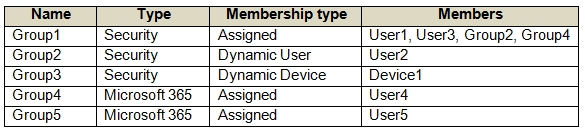
How many licenses are used if you assign the Microsoft 365 Enterprise E5 license to Group1?
Correct answer: B
QUESTION 14
You have an Azure Active Directory (Azure AD) tenant named contoso.com that contains an Azure AD enterprise application named App1.
A contractor uses the credentials of [email protected].
You need to ensure that you can provide the contractor with access to App1. The contractor must be able to authenticate as [email protected].
What should you do?
Correct answer: D
QUESTION 15
Your network contains an Active Directory forest named contoso.com that is linked to an Azure Active Directory (Azure AD) tenant named contoso.com by using
Azure AD Connect.
You need to prevent the synchronization of users who have the extensionAttribute15 attribute set to NoSync.
What should you do in Azure AD Connect?
Correct answer: C
QUESTION 16
Your network contains an on-premises Active Directory domain that syncs to an Azure Active Directory (Azure AD) tenant. The tenant contains the users shown in the following table.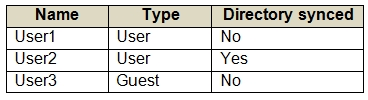
All the users work remotely.
Azure AD Connect is configured in Azure AD as shown in the following exhibit.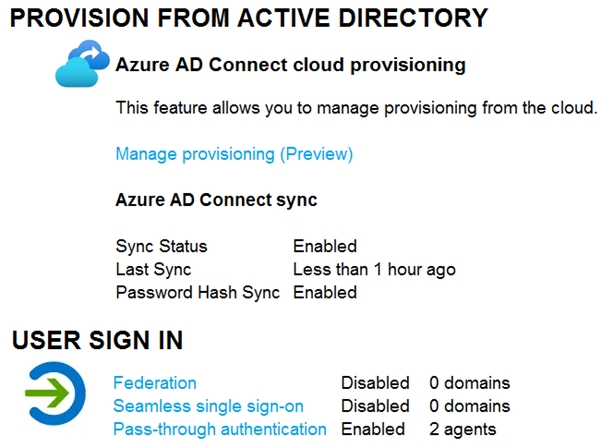
Connectivity from the on-premises domain to the internet is lost.
Which users can sign in to Azure AD?
Correct answer: A
QUESTION 17
Note: This question is part of a series of questions that present the same scenario. Each question in the series contains a unique solution that might meet the stated goals. Some question sets might have more than one correct solution, while others might not have a correct solution.
After you answer a question in this section, you will NOT be able to return to it. As a result, these questions will not appear in the review screen.
You have an Active Directory forest that syncs to an Azure Active Directory (Azure AD) tenant.
You discover that when a user account is disabled in Active Directory, the disabled user can still authenticate to Azure AD for up to 30 minutes.
You need to ensure that when a user account is disabled in Active Directory, the user account is immediately prevented from authenticating to Azure AD.
Solution: You configure Azure AD Password Protection.
Does this meet the goal?
Correct answer: B
QUESTION 18
HOTSPOT -
Your network contains an on-premises Active Directory domain named contoso.com. The domain contains the objects shown in the following table.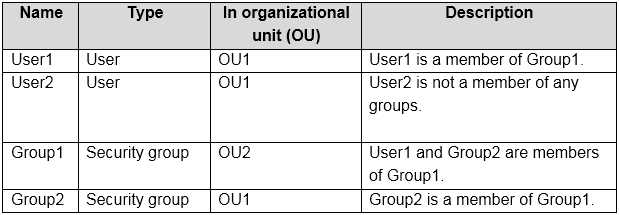
You install Azure AD Connect. You configure the Domain and OU filtering settings as shown in the Domain and OU Filtering exhibit. (Click the Domain and OU
Filtering tab.)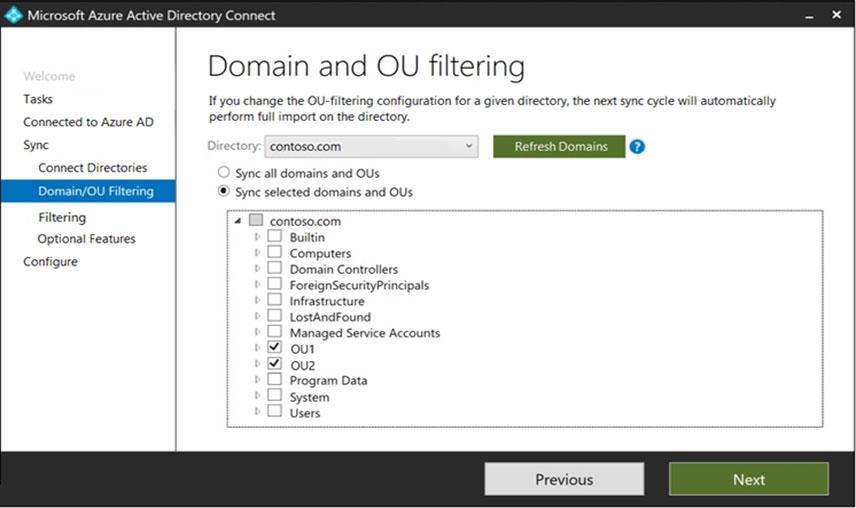
You configure the Filter users and devices settings as shown in the Filter Users and Devices exhibit. (Click the Filter Users and Devices tab.)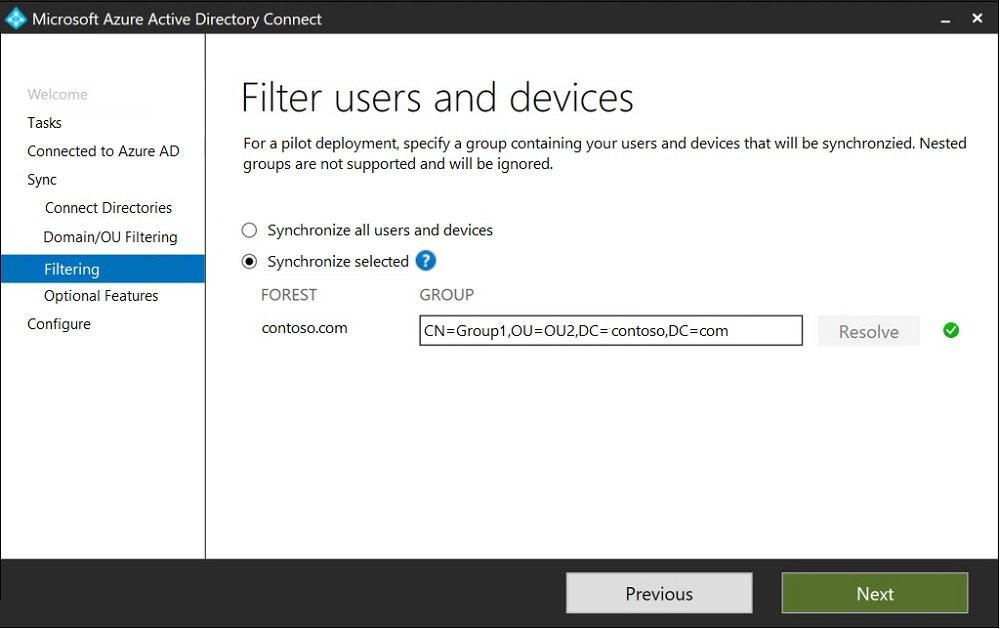
For each of the following statements, select Yes if the statement is true. Otherwise, select No.
NOTE: Each correct selection is worth one point.
Hot Area: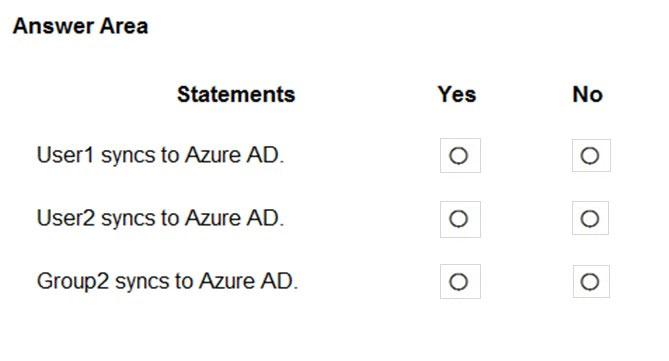
Correct answer: Y, N, Y
QUESTION 19
You have an Azure Active Directory (Azure AD) tenant named contoso.com.
You need to ensure that Azure AD External Identities pricing is based on monthly active users (MAU).
What should you configure?
Correct answer: C
QUESTION 20
DRAG DROP -
You have a new Microsoft 365 tenant that uses a domain name of contoso.onmicrosoft.com.
You register the name contoso.com with a domain registrar.
You need to use contoso.com as the default domain name for new Microsoft 365 users.
Which four actions should you perform in sequence? To answer, move the appropriate actions from the list of actions to the answer area and arrange them in the correct order.
Select and Place: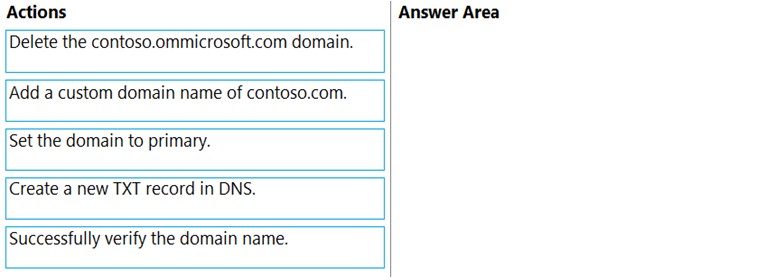
Correct answer: Item 1: B · Item 2: D · Item 3: E · Item 4: C
Choose SC-300 in Revizo and work through original, question-by-question practice on your iPhone. Review results, revisit what needs attention and keep your next session tied to one specific certification objective.
Practise SC-300 with RevizoNo. Revizo is an independent iPhone app for certification practice. Refer to the provider's official resources for current exam policies and registration.
Use the exam code to select the matching certification in Revizo, then build short, focused sessions around the areas you want to review.
No. Revizo provides original practice questions for certification study. Use the provider's official objectives, documentation and policies as the source of truth for your preparation.
Use the current Microsoft objectives, documentation and registration guidance as your source of truth. Revizo is designed to support focused practice, not replace the provider's official materials.
Check the official Microsoft exam page for the latest objectives, registration details and policies.